Brand: Woniry
Universal AC Remote 5000-in-1 (Almost All Brands)
Universal AC Remote 5000-in-1 (Almost All Brands)
- Pan India Fastest Delivery
- Premium Quality Remotes
79 in stock
Couldn't load pickup availability
This Woniry universal AC remote replaces lost or broken remotes for over 5000 air conditioner models. It covers every major brand sold in India: Voltas, Daikin, LG, Hitachi, Blue Star, Carrier, O General, Samsung, Whirlpool, Panasonic, Lloyd, Videocon, Electrolux, Mitsubishi, Haier, TCL, Sharp, and many regional brands.
Compatible Models:
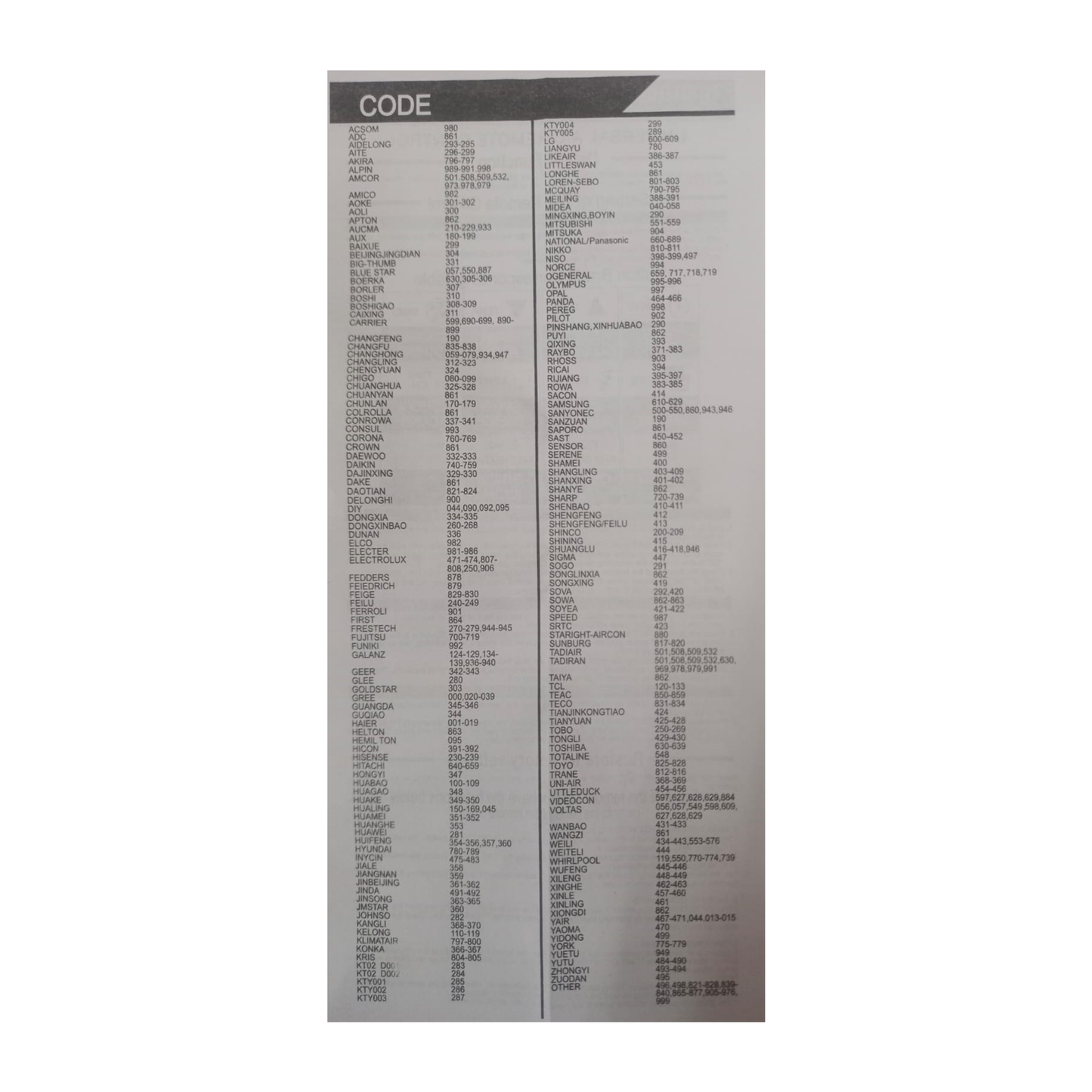
This remote stores codes for 5000+ AC models. It works with split air conditioners, window units, portable ACs, and inverter models from 1 ton to 2 ton and beyond. If your AC uses an infrared remote (the vast majority do), this will control it. The auto-code search method means you do not need to know your exact model number.
What is in the box:
One universal AC remote (batteries not included). You need two AAA cells.
How to use it:
1. Insert two AAA batteries.
2. Point the remote at your AC indoor unit from about 2 metres away.
3. Press and hold the 'SET' button (or 'Code Search' if labelled that way) until the display blinks or you see a symbol flashing.
4. Press the 'Temp +' or 'Power' button slowly, once every two seconds. The remote cycles through stored codes.
5. When your AC beeps or switches on, release immediately. Press 'OK' or 'Set' to lock that code.
6. Test the mode, fan speed, and swing buttons to confirm everything responds.
Or Watch This video
" https://youtube.com/shorts/YWejBSf9XnM?si=HAdEW8lDWIJ2V4yv "
The process takes 30 to 90 seconds for most ACs. If you overshoot, start again. Some remotes also support manual brand code entry (a three-digit number from a booklet), but auto-search is faster and works even when you do not know the brand code.
Honest notes:
This remote cannot learn custom functions. If your original remote had a 'health mode', 'ioniser', or 'self-clean' button with a unique code, the universal may not replicate it. Core functions (power, temperature, mode, fan, swing, timer, sleep) work on almost every AC. Also, a few very old CRT-display window ACs from the early 2000s use proprietary signals. If auto-search cycles through all 5000 codes without a response, your AC might be one of those rare exceptions.
Why 5000-in-1 matters:
Competitor universal remotes store 1000 or 2000 codes. This one stores 5000. That means better coverage of newer inverter models released in the past three years, plus obscure regional brands like Takai, Worldtech, and Koryo that smaller code libraries skip. More codes mean a higher chance of finding your exact AC on the first auto-search attempt.
FAQ:
Q: Will this work with my Voltas 1.5 ton 3-star split AC?
A: Yes. Voltas uses standard IR codes across all their split and window models. Auto-search will detect it in under a minute.
Q: Does it need pairing or setup software?
A: No pairing. It is an IR remote. Just batteries and the auto-code search button sequence above.
Q: Can I control two different brand ACs in the same room with one remote?
A: You can, but you will need to run auto-search again every time you switch between them. The remote only stores one brand code at a time. If both ACs happen to be the same brand, one remote press will control both.
Q: My AC is a 2023 Daikin inverter model. Will the code be in there?
A: Most likely yes. The 5000-code library includes Daikin inverter codes up to 2023. Run auto-search and see. If Daikin released a completely new signal protocol mid-2024, it might not be there yet, but that is rare.
Q: What if I lose power during a storm and the remote forgets the code?
A: The code stays saved even when you remove the batteries. You set it once and you are done unless you accidentally trigger another auto-search.